
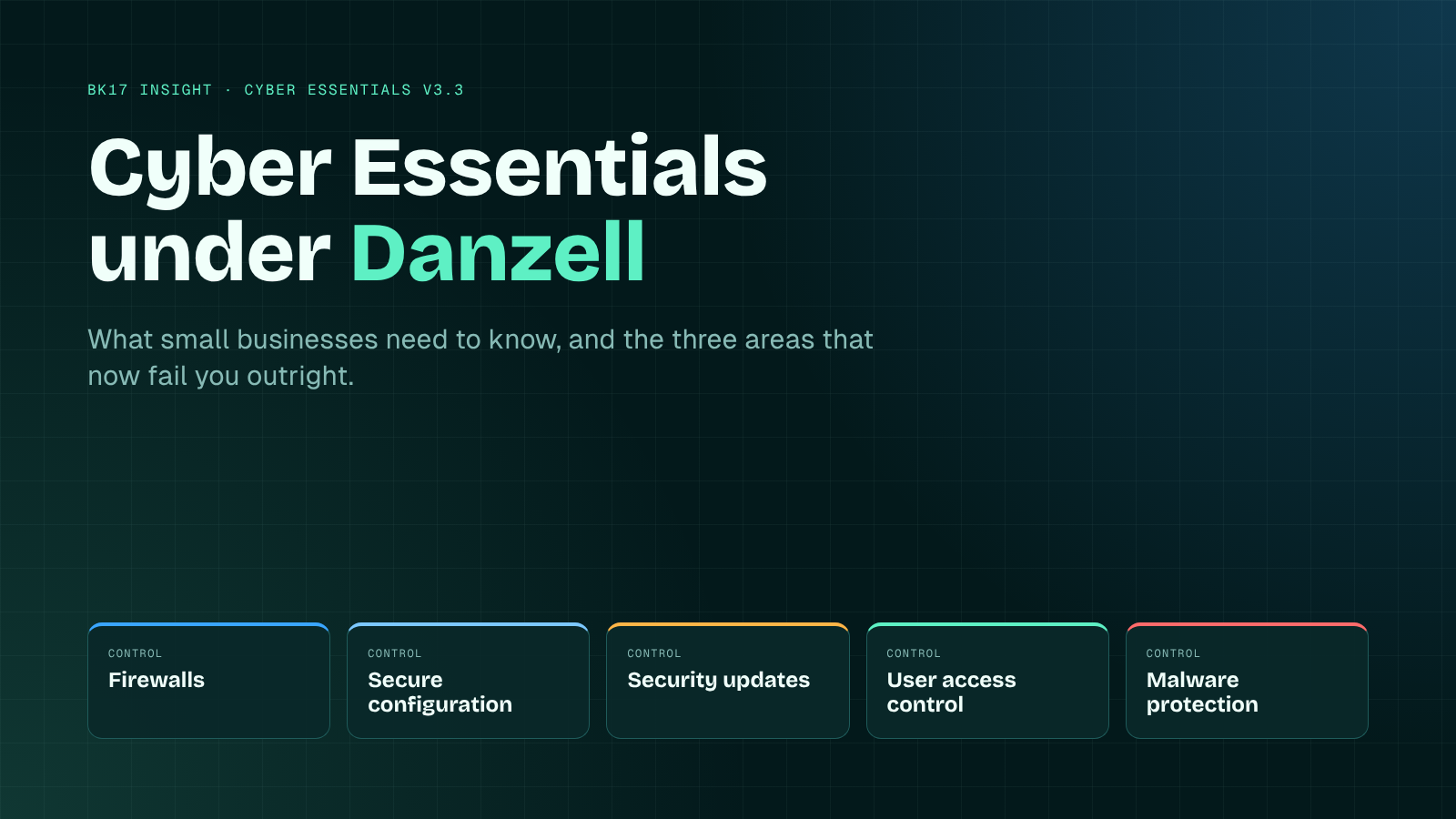
Every Cyber Essentials renewal is now assessed against v3.3 and the Danzell question set. Three areas now fail you outright. Here's what changed, where small businesses come unstuck, and how to get ready.
If your Cyber Essentials renewal is due this winter, the questions you answer won't be quite the ones you answered last year.
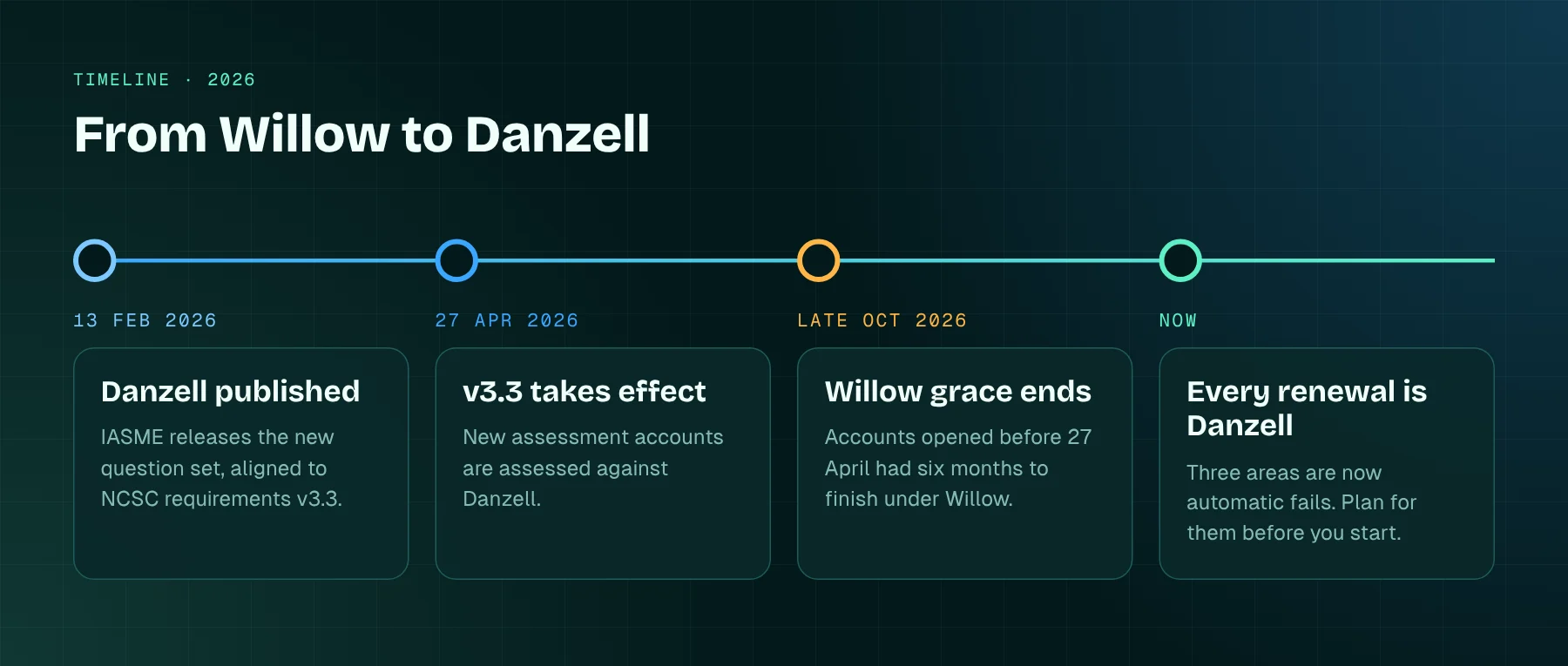
Since 27 April 2026, new assessment accounts have been assessed against version 3.3 of the NCSC's requirements, through IASME's "Danzell" question set. Organisations that had already opened an account were given six months to finish under the old "Willow" questions, and that window has now closed. So every small business renewing from here on meets Danzell, whether or not anyone told them it had changed.
Most of it will feel familiar. The five technical controls haven't moved: firewalls, secure configuration, security update management, user access control and malware protection. What has changed is that some answers which used to mean "fix this and resubmit" now fail the whole assessment. And they're exactly the areas where small businesses most often come unstuck.
Why it matters
It's easy to treat Cyber Essentials as a box to tick for a tender. The government itself sells it partly as a way into public sector work, and eligible organisations can get free cyber insurance alongside it.
But the scheme earns its keep in less obvious ways. In February 2026 the government reported that organisations with Cyber Essentials in place made 92% fewer insurance claims. Its Cyber Security Breaches Survey, published in April, found that 43% of businesses had suffered a breach or attack in the previous twelve months, and 46% of small businesses. Phishing was the most common attack by a distance. Yet only 17% of businesses had heard of Cyber Essentials, and around 5% held it.
Put those together and the message is plain. Five basic controls stop most of the everyday attacks that hit small firms, and most small firms still don't have them properly in place.
What's actually changed in v3.3
Three areas now fail you on their own
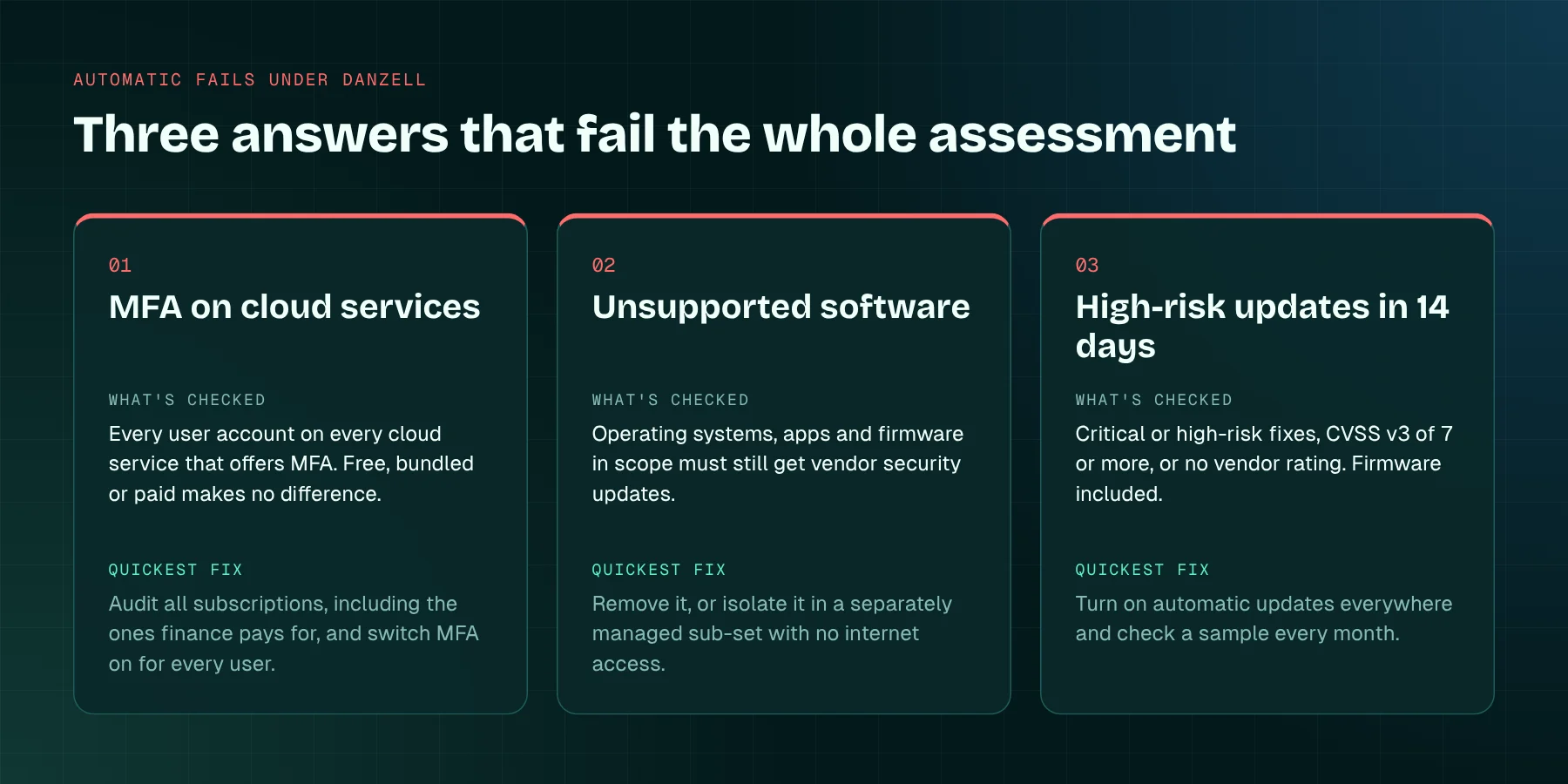
Under Danzell, three things move from "needs attention" to an automatic fail:
- MFA on cloud services. If a cloud service you use offers multi-factor authentication and you haven't turned it on, you fail. That covers every user account, not just administrators, and it doesn't matter whether the service is free, bundled with something else or paid for.
- Unsupported software. Anything in scope that's no longer supported by its vendor has to be removed, or isolated in a separately managed sub-set with no internet access.
- High-risk updates left too long. Updates that fix vulnerabilities the vendor rates as critical or high risk, or that score 7 or more under CVSS v3, or that come with no severity information at all, must be installed within 14 days of release. That includes router and firewall firmware, not just Windows.
None of these is a brand-new rule. MFA on cloud services, supported software and the 14-day window were all there under Willow. The difference is the consequence. A "we're working on it" answer no longer gets you through.
Cloud services can't be left out
Version 3.3 adds a proper definition of a cloud service. In short: an on-demand, scalable service on shared infrastructure, reached over the internet through an account, that stores or processes your organisation's data. Where that's true, the standard is blunt. Cloud services cannot be excluded from scope.
In practice, that's your Microsoft 365 or Google Workspace tenant, your accounting package, CRM, file-sharing tool, HR system and payroll portal. If staff sign in to it and company data lives in it, it's in.
Scope has to be justified
The old wording about "untrusted" and "user-initiated" internet connections has gone. Any device or software that can reach the internet, or that controls data flowing to it, is in scope. You can still certify a sub-set of the organisation, but you have to justify the boundary and explain how it's segregated, and a scope that leaves out end-user devices isn't acceptable. You'll also need to list every legal entity covered, with its company number.
Smaller changes worth knowing
- Passkeys and other passwordless sign-in methods are now called out in the user access control section as stronger than passwords.
- The web applications section is now "application development" and points to the government's Software Security Code of Practice. Commercial web applications you use are in scope by default; bespoke code you build isn't.
- Backup guidance has moved nearer the front. Backups still aren't a technical requirement, but the NCSC strongly recommends them, and so do we.
- The "point in time" for the assessment is now the date the certificate is issued. Your systems must be supported on that day, and the declaration you sign includes a commitment to stay compliant for the year.
- For Cyber Essentials Plus, if a sampled device fails the update check, the retest covers the original sample plus a fresh random one. Fail again and the underlying Cyber Essentials certificate is revoked. IASME says it tightened this after a small number of organisations patched only the devices being tested.
Where small businesses fall down
None of what follows is exotic. It's what we see again and again when we help organisations get ready.
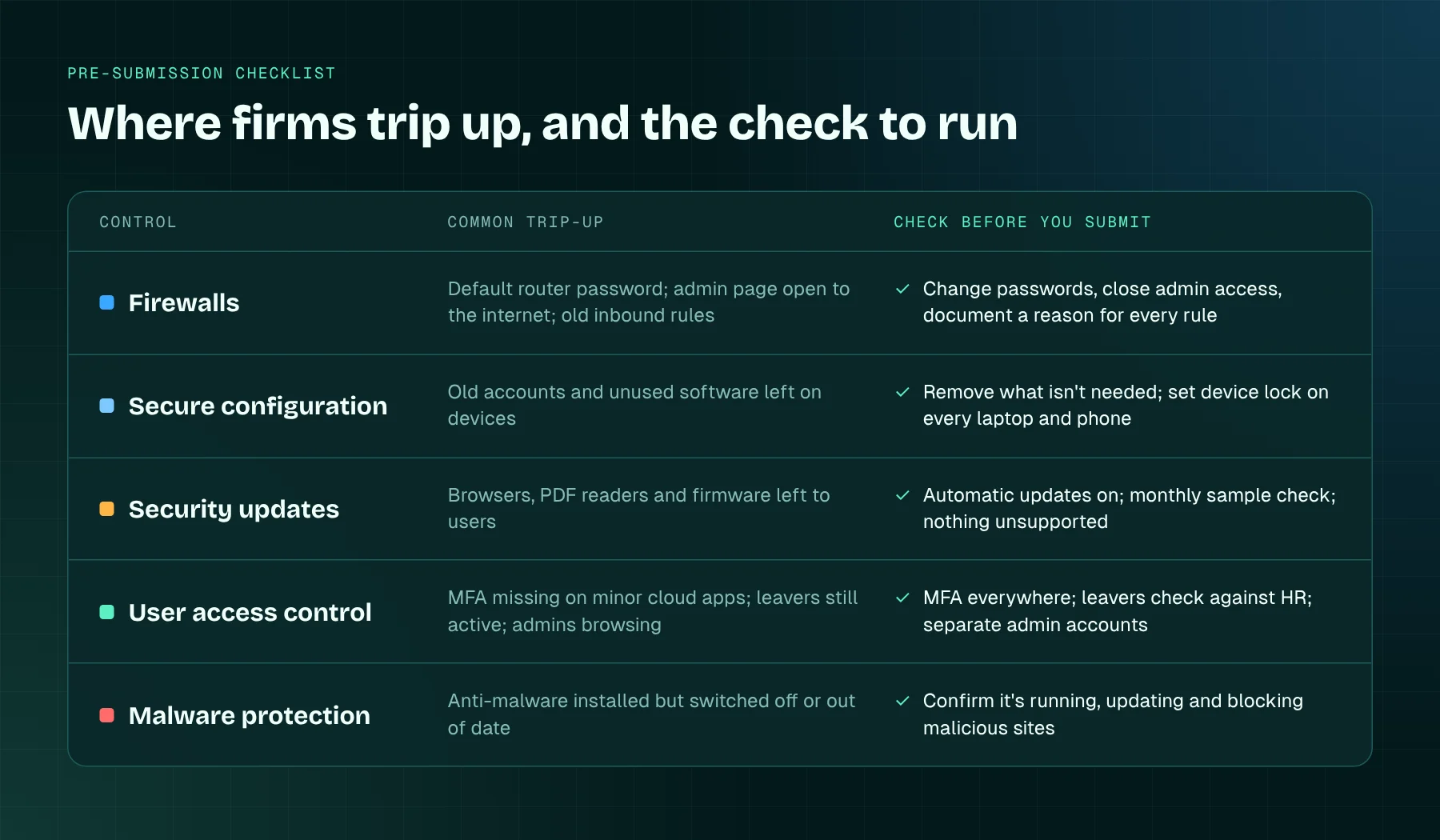
MFA that's on, but not everywhere. The main email system nearly always has it. The gaps sit around the edges: the accounting platform someone set up years ago, the social media scheduler, the supplier portal, the old admin account nobody uses but nobody's closed. Under Danzell, any one of those can fail you.
The forgotten device. An old laptop that still connects now and then. A PC kept on an unsupported operating system because one piece of software won't run anywhere else. If it's in scope and unsupported, it's an automatic fail.
Patching that relies on goodwill. Automatic updates are on for the operating system but not for browsers, PDF readers or the firewall. Fourteen days isn't long when it depends on someone remembering, especially across a bank holiday.
Admin accounts used for everything. The director's everyday account holds full admin rights and is used for email and browsing. The requirements are clear that admin accounts should be separate and used only for admin work.
Firewall housekeeping. Default router passwords, admin pages reachable from the internet, and inbound rules opened for a supplier who left years ago. Every inbound rule needs an approved, documented business reason, and should go when the reason does.
Leavers. Accounts kept open "for handover" that never get closed. The requirements say accounts must be removed or disabled when they're no longer needed, including after a defined period of inactivity.
Answers written by someone who doesn't run the systems. The self-assessment is signed off by a director, but often filled in by whoever had time. If the answers don't match what's actually configured, you're exposed at assessment and, more importantly, in real life.
Practical steps before you submit
You don't need a big project. You need a few honest hours and the right people in the room.
- Find every cloud service. Don't stop at IT's list. Go through card statements and direct debits for subscriptions. For each service, note who the admin is and whether MFA is on for every user.
- Turn MFA on wherever it's offered. Where a service supports passkeys, consider them. They're quicker for staff and harder to phish.
- Build a device and software inventory. Laptops, desktops, phones and tablets used for work, servers, routers and firewalls, each with its operating system and version. Remove or isolate anything unsupported before you start the questions, not after.
- Automate updates, then check them. Switch on automatic updates wherever you can, and check a sample of devices every month. Include firewall and router firmware.
- Split admin accounts. Give anyone with admin rights a separate account for admin work only, and remove rights that are no longer needed.
- Review the firewall. Change default passwords, close admin interfaces to the internet, and write down why each inbound rule exists.
- Run a leavers check. Compare your user list against HR records and disable anything that shouldn't be there.
- Write the scope down. Which legal entities, which offices and home workers, any sub-sets, and why the boundary sits where it does.
- Use the free help. The NCSC's Readiness Tool and free 30-minute sessions with an NCSC-assured adviser are there for small firms, and IASME publishes the question set in advance so you can see it before you start.
Then keep it going. The certificate lasts 12 months, and the declaration now asks you to stay compliant for all of them, not just on the day.
Where Cyber Essentials fits
Cyber Essentials isn't ISO 27001. It checks five technical controls at a point in time. It doesn't ask you to assess risk, manage suppliers or improve year on year. But the evidence overlaps a great deal. Your asset inventory supports ISO 27001 Annex A 5.9. Patch records feed 8.8, technical vulnerability management. Admin account separation and MFA sit under 8.2 and 8.5. If ISO 27001 is on your horizon, build Cyber Essentials as its foundation rather than a separate exercise you redo every year.
How BK17 can help
We help small businesses get ready for Cyber Essentials and Cyber Essentials Plus: scoping, a gap review against v3.3, a practical remediation plan, and a run-through of the Danzell questions before you submit to a licensed certification body. We give advice and readiness support; the certification decision is always the certification body's.
If you'd rather not rebuild the evidence from scratch every year, TheMS, our compliance management system, keeps your policies, asset records and evidence in one place, shared across every standard you hold. When renewal comes round, the answers are already there.
Talk to us about Cyber Essentials before your renewal date, not the week it's due.
Explore topics
Written by
BK17 Editorial
Content creator and writer sharing insights and stories.